
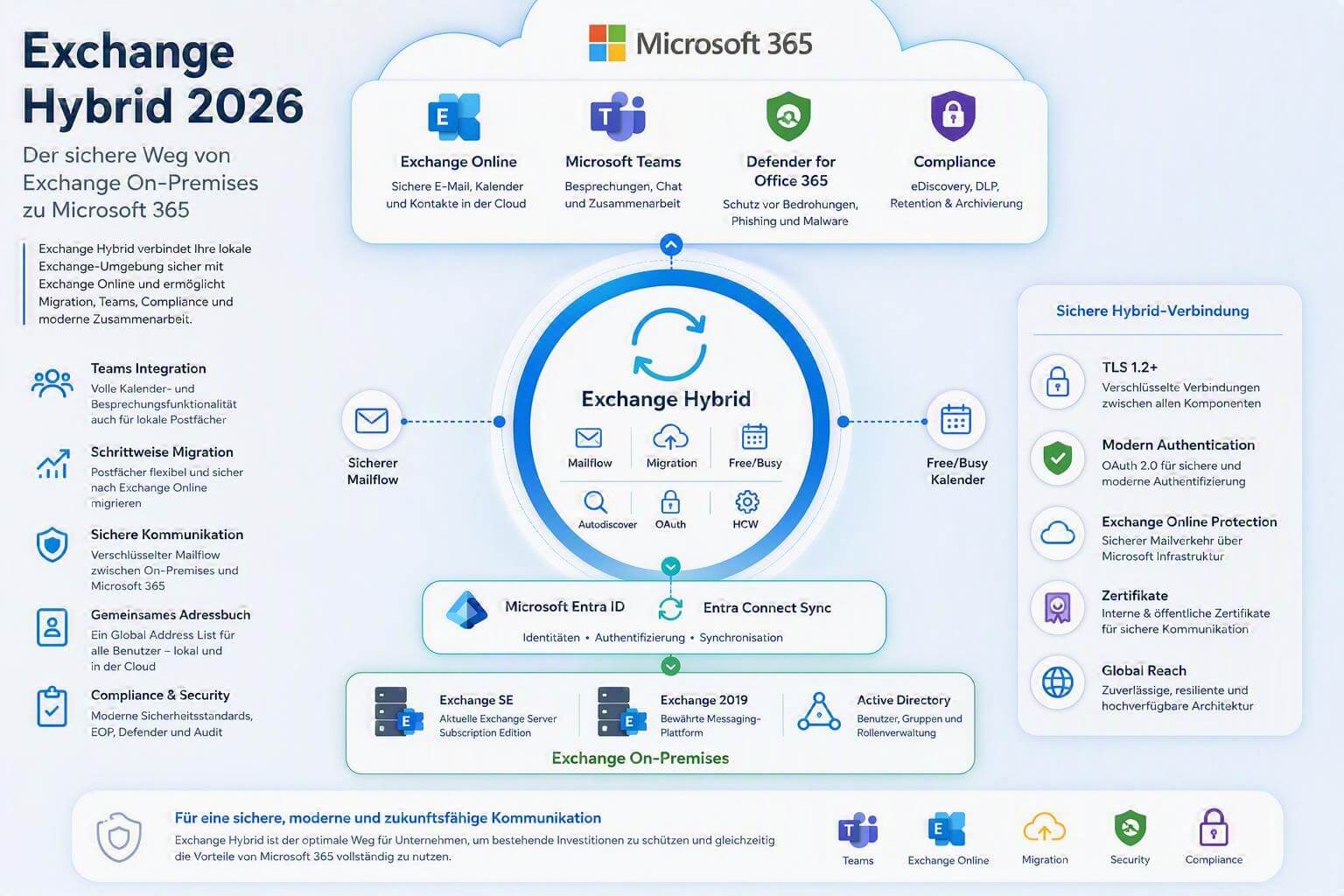
Many companies face the challenge of connecting their existing Exchange infrastructure with Microsoft 365 and Exchange Online. Whether for Microsoft Teams, a phased migration to the cloud, or the long-term modernization of the IT landscape – Exchange Hybrid is often the ideal way to connect both worlds. Exchange Hybrid enables the secure coexistence of an on-premises Exchange organization with Exchange Online and ensures that users can collaborate seamlessly regardless of where their mailbox is located.
What is Exchange Hybrid?
In an Exchange Hybrid deployment, an on-premises Exchange organization and a Microsoft 365 tenant are linked. This creates a unified communications platform where users can work both in Exchange Online and on on-premises Exchange servers.
Key features include:
– Shared Global Address List (GAL)
– Free/Busy information
– Secure email communication between the cloud and on-premises environments
– Centralized recipient management
– Seamless mailbox migration
– Shared use of Microsoft Teams and Exchange
– Phased migration to Exchange Online
Why Exchange Hybrid?
Many companies want to leverage the benefits of Microsoft 365 without immediately replacing their existing Exchange infrastructure completely.
Typical reasons for a hybrid deployment include:
Introducing Microsoft Teams
Microsoft Teams uses Exchange services for:
- Calendar
- Meeting scheduling
- Free/Busy information
- Meeting invitations
- A hybrid configuration enables full integration of on-premises mailboxes with Microsoft Teams.
Phased migration to Exchange Online
Not every company wants to migrate all mailboxes at the same time. Exchange Hybrid enables a controlled transition with pilot groups and phased migrations.
Compliance and governance
Many organizations temporarily still require on-premises systems due to legal or operational requirements. Exchange Hybrid provides the necessary flexibility during the transition phase.
When is Exchange Hybrid needed?
Exchange Hybrid is particularly recommended when:
 On-premises Exchange servers are in place A migration to Microsoft 365 is planned Microsoft Teams is to be used with on-premises mailboxes Users need to work in Exchange Online and on-premises at the same time Free/Busy information is required between the cloud and on-premises Exchange Mailboxes are to be migrated in phases
Do you need help setting up or optimizing Exchange Hybrid? Contact us now.
When is Exchange Hybrid no longer required?
Not every company needs a hybrid environment long term.
In many modern cloud-only scenarios, the following is sufficient:
- Microsoft Entra ID
- Exchange Online
- Microsoft Teams
- SharePoint Online
- OneDrive for Business
If all mailboxes are already hosted in Exchange Online and there are no longer any on-premises Exchange dependencies, the hybrid configuration can often be decommissioned.
Requirements for Exchange Hybrid
Before implementation, the following prerequisites should be met:
Supported Exchange versions
Currently, the following platforms are mainly used:
- Exchange Server 2019
- Exchange Server Subscription Edition (SE)
Microsoft recommends using Exchange Server Subscription Edition long term as the successor to classic Exchange versions.
Updated systems
The Exchange Server should be:
- fully patched
- running the latest security updates
- supporting modern authentication
Public accessibility
For certain hybrid scenarios, the following components are required:
- Autodiscover
- Exchange Web Services (EWS)
- HTTPS access
- TLS certificates
The services must be correctly published and reachable.
Identity synchronization
For consistent user management, Microsoft Entra Connect Sync is used.
Synchronization ensures that user identities are matched between on-premises Active Directory and Microsoft 365.
Set up Exchange Hybrid
The recommended method for setup is the Hybrid Configuration Wizard (HCW).
The HCW handles the automatic configuration between:
- Exchange On-Premises
- Exchange Online
- Microsoft Entra ID
- Mail routing components
This sets up the required connectors, authentication mechanisms, and organization relationships.
Classic Hybrid vs. Modern Hybrid Agent
Microsoft offers different hybrid models.
| Feature | Classic Hybrid | Modern Hybrid Agent |
|---|---|---|
| Exchange publicly accessible | Yes | Limited |
| Full coexistence | Yes | Partially |
| Free/Busy | Yes | Yes |
| Mail routing | Complete | Depends on the scenario |
| Complexity | Higher | Lower |
| Recommendation for migrations | Very well suited | Suitable for smaller environments |
The choice depends on the requirements and the existing infrastructure.
Security in an Exchange Hybrid environment
Modern hybrid environments must meet significantly higher security requirements than just a few years ago.
The following measures should be implemented:
Modern Authentication
Classic basic authentication should be fully replaced by:
- OAuth
- Modern Authentication
- Token-based sign-in
Multi-factor authentication (MFA)
MFA should be mandatory, especially for administrators.
Conditional Access
Microsoft Entra Conditional Access protects access based on:
- Location
- Device type
- User role
- Risk assessment
Email protection
Recommended are:
- Exchange Online Protection (EOP)
- Microsoft Defender for Office 365
- Anti-phishing policies
- Safe Links
- Safe Attachments
Email authentication
The following standards should be set up:
- SPF
- DKIM
- DMARC
These significantly reduce spoofing and phishing attacks.
Typical issues with Exchange Hybrid
In practice, the following errors occur frequently:
Autodiscover does not work
Possible causes:
- DNS errors
- Certificate issues
- Incorrect URLs
Teams calendar not available
Often caused by:
- Missing hybrid configuration
- Faulty Modern Authentication
- Incorrect OAuth configuration
HCW fails
Possible reasons:
- Missing permissions
- DNS issues
- Proxy configurations
- Outdated Exchange versions
Free/Busy does not work
Often caused by:
- Organization relationships
- Certificate issues
- OAuth errors
Typical migration path to Exchange Online
Many companies use Exchange Hybrid as a transition to the cloud.
A typical approach looks like this:
Exchange On-Premises
▼
Microsoft Entra Connect Sync
▼
Set up Exchange Hybrid
▼
Pilot migration of individual users
▼
Phased mailbox migration
▼
Exchange Online operation
▼
Hybrid decommissioning (optional)
This model enables a secure and controlled transformation without major interruptions to business operations.
Benefits of Exchange Hybrid at a glance
✅ Phased cloud migration
✅ Seamless user experience
✅ Shared address book
✅ Free/Busy information
✅ Microsoft Teams integration
✅ Secure email communication
✅ Flexible operating models
✅ Support for modern compliance requirements
✅ Protecting investments in existing Exchange infrastructures
Conclusion
Even in 2026, Exchange Hybrid remains the preferred solution for companies that want to introduce Microsoft 365 or modernize existing Exchange environments in phases. The hybrid configuration connects on-premises Exchange servers with Exchange Online and enables seamless collaboration between both worlds. Thanks to modern security mechanisms, flexible migration options, and tight integration with Microsoft Teams, Exchange Hybrid remains a key building block on the path to the cloud for many organizations.


Leave A Comment